The learning journal: starting points, observations and the 2-year check
Ofsted asks for three things, not a folder: starting points, ongoing assessment and the 2-year check. Record all three here — and let AI do the write-ups.
3 min read
Ofsted asks for three things, not a mountain
Despite the sector's paperwork habit, Ofsted doesn't want a folder of evidence for every child. The EYFS asks for three things: starting points when a child joins you, ongoing assessment as you go (no written record required — EYFS 2.4), and one written summary — the progress check at age two. The Learning tab holds that trio and nothing more; anything extra is for parents, not Ofsted.
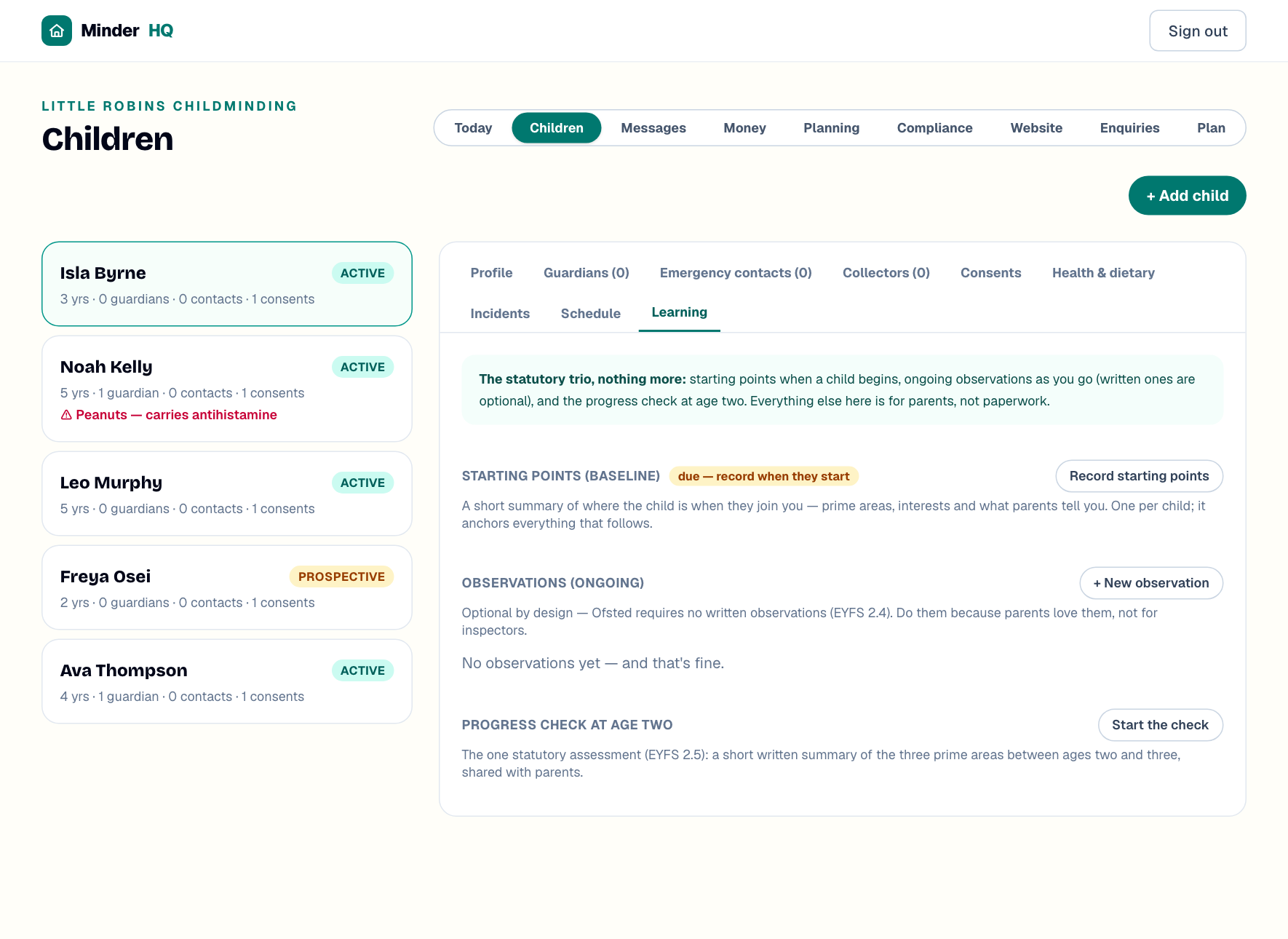
You'll find it under "Children": pick a child, then open the "Learning" tab. In the app, the Today tab is native and "Manage" opens these same views.
Starting points (the baseline)
Every child needs a short baseline — a few honest lines on where they are when they start. One per child, and it anchors everything that follows. Until it's done, you'll see an amber "due — record when they start" badge.
- 1On the child's "Learning" tab, tap "Record starting points".
- 2Write a line or two under each prime area, plus "Interests & fascinations" and "What parents told you".
- 3Leave "Share with parents on their portal" ticked, then tap "Save starting points".
Let All About Me do the typing
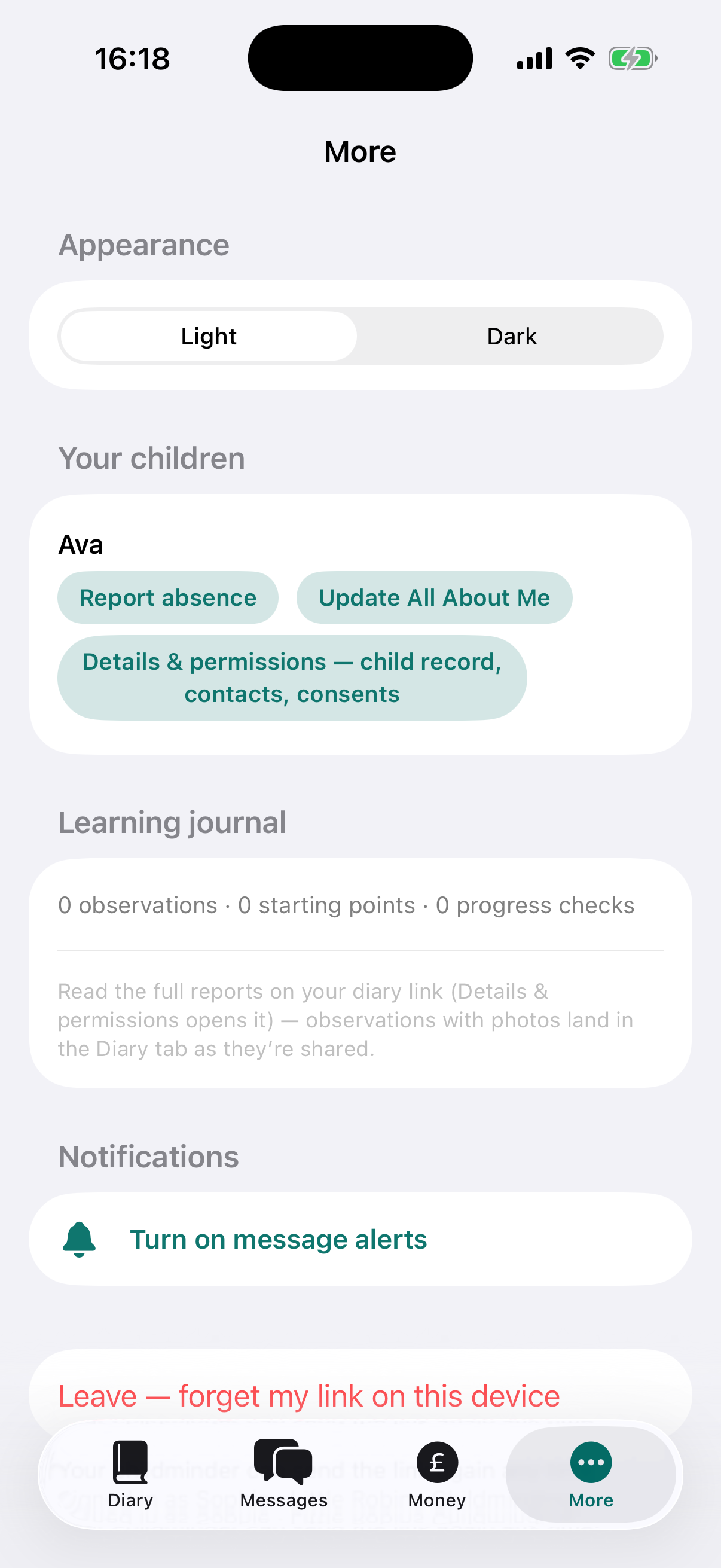
Parents can fill in All About Me from their app (under "More") — interests, routines, comforters, the words their child uses, food. It appears as a card at the top of the Learning tab; tap "Use in baseline" and their answers pour straight into the starting points form, ready to trim.
Tip: Send the portal invite before day one and ask parents to do All About Me first — your baseline then half-writes itself.
Observations: optional, and quicker than you think
Written observations are optional by design — Ofsted requires none (EYFS 2.4). Do them when a moment's worth sharing, because parents love them, not for inspectors.
- 1Tap "+ New observation".
- 2Jot a few rough words in "What did you notice?" — "poured water between cups, v focused" is plenty.
- 3Tap "Write it up for me" — AI expands your note into a tidy observation with a suggested next step. It only rephrases what you typed; nothing saves until you do.
- 4Tag the "Areas of learning" that apply — the three prime areas come first, then Literacy, Mathematics, Understanding the world and Expressive arts & design.
- 5Add a photo if you like, then tap "Save observation".
Tip: Untick "Share with parents on their portal" if a note is just for you — it stays marked "private".
The progress check at age two
This is the one statutory written assessment: a short summary of the three prime areas, done between a child's second and third birthdays — and parents must receive it. Saved checks show a "shared with parents" or "not yet shared" badge.
- 1On the "Learning" tab, tap "Start the check".
- 2Write a short, honest summary under "Communication & language", "Physical development" and "Personal, social & emotional development".
- 3Add "Strengths" and "Any concerns" — if development is behind expectations, describe it, and the "Plan" of activities and strategies becomes required.
- 4Leave "Share with parents now" ticked, then tap "Save progress check".
Quick answers
Do I have to write observations for every child?
No. The only required write-ups are starting points and the progress check at age two — observations are entirely optional.
Does "Write it up for me" save or share anything itself?
No. It only rewrites the note in the box — you can edit the draft, and nothing is saved or shared until you tap "Save observation".
What if I have concerns at the two-year check?
Describe them under "Any concerns" — the "Plan" of activities and strategies then becomes required. Talk it through with parents when you share the check.