Compliance wallet and inspection day
Track every renewal Ofsted can ask about, get amber and red warnings plus Monday email nudges, and print an inspection-ready pack in seconds.
4 min read
Everything Ofsted can ask for, in one place
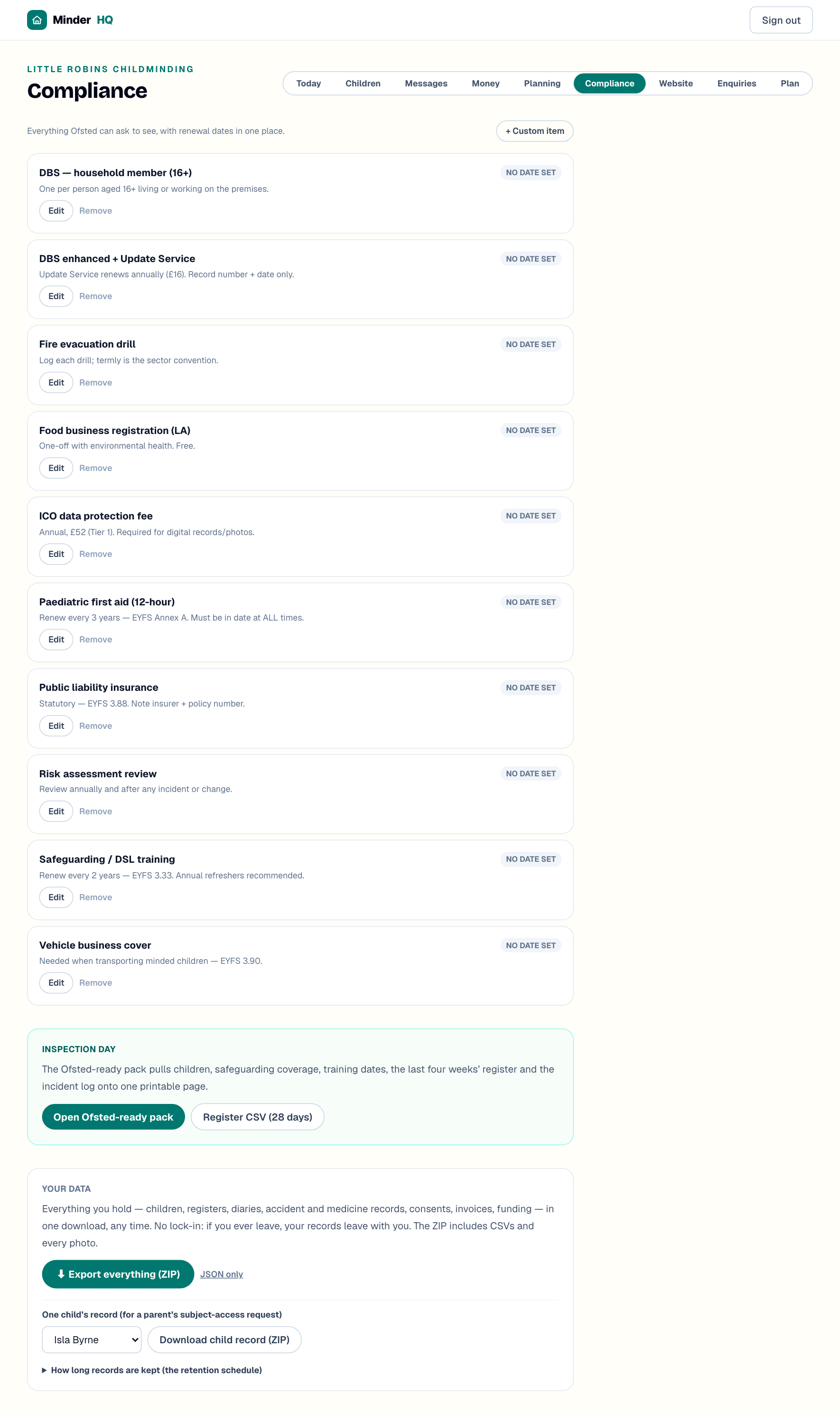
The Compliance view is a wallet of your renewals and checks — first aid, safeguarding training, DBS, insurance and the rest — each on a card with when it was last done and when it's next due. Everything Ofsted can ask to see, with renewal dates in one place.
Find it in the "Compliance" tab of your workspace. In the MinderHQ app, Today is built in and "Manage" opens these same views, so it works the same on your phone.
Start with the standard set
An empty wallet shows one button that adds the statutory starter set: "Paediatric first aid (12-hour)", "Safeguarding / DSL training", "DBS enhanced + Update Service", "DBS — household member (16+)", "ICO data protection fee", "Public liability insurance", "Vehicle business cover", "Food business registration (LA)", "Fire evacuation drill" and "Risk assessment review".
- 1Open "Compliance" and tap "Add the standard set".
- 2Tap "Remove" on anything that doesn't apply to you — no car means no "Vehicle business cover".
- 3For anything extra (an assistant's certificate, say), tap "+ Custom item", type a name and tap "Add".
Dates, badges and the Monday nudge
Badges do the worrying. A card with no date shows "no date set"; within 60 days of its due date it turns amber; past it, red with "overdue". When anything is amber or red, a banner at the top counts it up — inspectors check these first.
There's a nudge without opening the app too: on Monday mornings MinderHQ emails you if anything is overdue or due within the next six weeks — the same email flags funding codes to reconfirm and unpaid invoices. Nothing needs doing? No email.
- 1Tap "Edit" on a card.
- 2Fill in "Last done" and "Next due / expires". Use "Who it belongs to" for an assistant's or household member's item, and "Reference / provider" for certificate numbers.
- 3Tap "Save".
Tip: For training courses, set "Next due / expires" a few weeks before the certificate truly runs out — that leaves time to book the renewal rather than hunt for a last-minute place.
Inspection day: the Ofsted-ready pack
When the call comes, don't hunt through folders. The Ofsted-ready pack puts what an inspector asks for on arrival on one printable page: children on roll with dates of birth, start dates, allergies, contacts, collectors and consents; your training, checks and documents with their dates; the last 28 days' register; the quarter's accident and incident log (dates, types and whether parents were told); and a count of active medication permissions.
- 1Open "Compliance" and scroll to the "Inspection day" card.
- 2Tap "Open Ofsted-ready pack" — it opens in a new tab.
- 3Tap "Print / save as PDF" for a paper copy or a PDF to keep.
Tip: Open the pack once a term as a dry run. A missing date or a child with no emergency contact is far easier to fix over a cuppa than on inspection morning.
The attendance register in seconds
Asked for the register on its own? The same card exports the last 28 days as a CSV — one row per entry: date, child, time in, time out, hours and who collected. It's built from the check-ins and check-outs you tap on the Today board, so keeping those up to date is all the register-keeping you need.
- 1On the "Inspection day" card, tap "Register CSV (28 days)".
- 2The button reads "Building…" for a moment, then the file downloads, named with today's date.
Quick answers
Do I have to keep every item in the standard set?
No — it's a starting point. Tap "Remove" on anything that doesn't apply, and add your own with "+ Custom item".
Can I track an assistant's certificates?
Yes. Add each one with "+ Custom item", then tap "Edit" and put their name in "Who it belongs to" so the card shows whose it is.
How far back do the pack's register and incident log go?
The register covers the last 28 days and the accident and incident log covers the last quarter. Your full records stay in MinderHQ if an inspector wants more.